

Urgent Notice: Starting April 15, 2026, you can no longer edit or publish Shopify Scripts. On June 30, 2026, all Shopify Scripts stop working entirely. If your store depends on Scripts for discounts, shipping, or payment logic you need to act now.
If you are running a Shopify Plus store, you have likely relied on Shopify Scripts to handle some of your most important checkout customizations” automated discounts, tiered pricing, custom shipping rules, or hidden payment methods. For years, these scripts were the go-to solution for merchants who needed logic that went beyond what the standard admin offered. That era is officially ending.
Shopify has confirmed that Shopify Scripts will be fully retired on June 30, 2026. After that date, any checkout logic built on these legacy scripts simply stops running. There are no warnings, no grace periods, and no fallback. Your checkout either works or it doesn’t — and if you haven’t migrated, it won’t.
I have been helping merchants migrate to Shopify and Shopify Plus for years at Ruby Digital Agency, and this is one of the biggest mandatory platform changes I have seen. In this post, I am going to break down exactly what is happening, what your options are, and how to put a realistic plan together before the deadline hits.
In This Article
- What Are Shopify Scripts?
- Why Is Shopify Retiring Scripts?
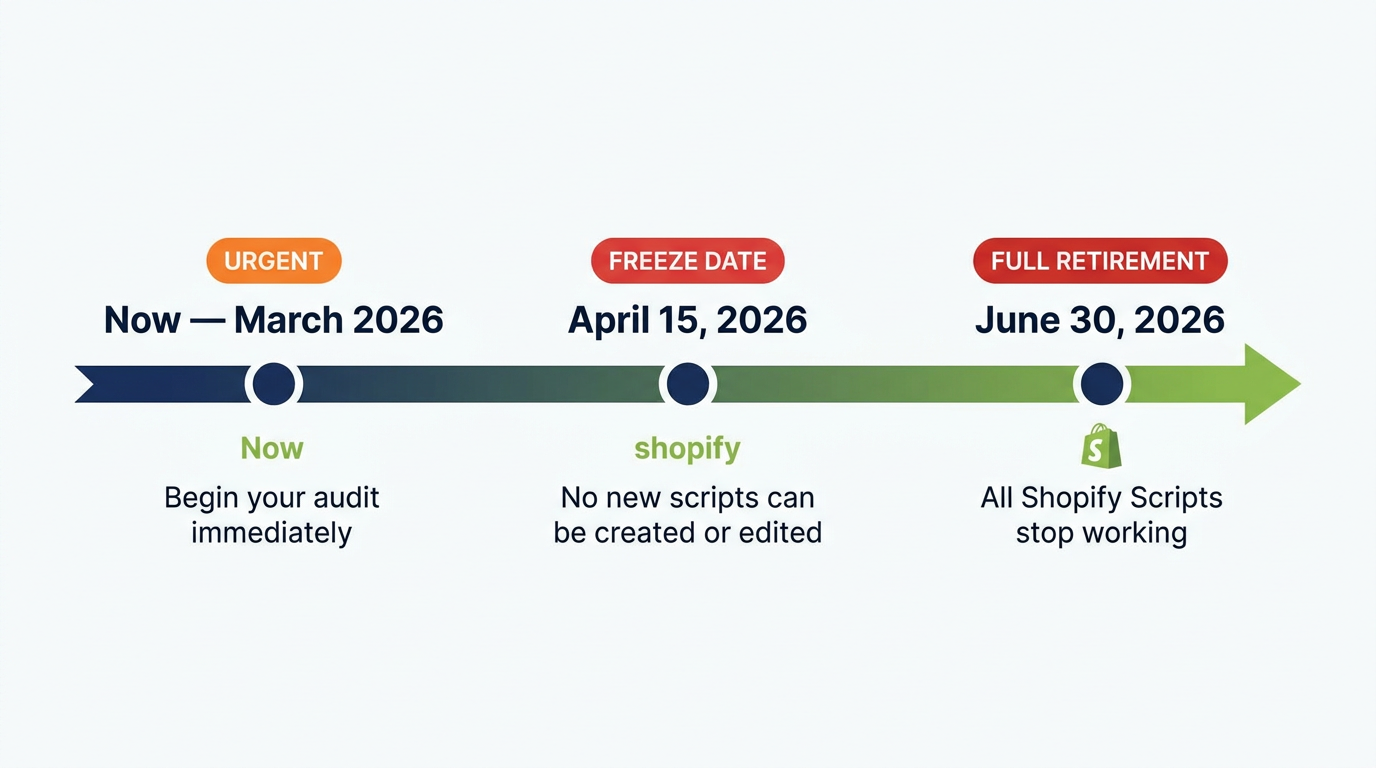
- The Key Dates You Must Know
- What Do These Scripts Actually Do?
- Your Replacement: Shopify Functions
- Scripts vs. Functions” What Changes?
- Your Step-by-Step Migration Plan
- No-Code Apps to Replace Legacy Scripts
- Share This Post
What Are Shopify Scripts?
Shopify Scripts are small pieces of Ruby code that run during the checkout process on Shopify Plus stores. Introduced years ago as a way to give enterprise merchants more control over their checkout, the Scripts allowed store owners to customize three core areas of the purchasing flow: line items (cart discounts), shipping methods, and payment options.
Because they ran server-side during checkout, scripts gave merchants the power to do things that standard Shopify discount rules could not handle” like automatically applying a Buy One Get One (BOGO) discount without a coupon code, offering tiered pricing based on cart value, or hiding certain payment gateways for specific customer segments.
The catch? these scripts required Ruby coding knowledge, lived in the legacy Script Editor app, and were only available on Shopify Plus. They also had performance limitations at high traffic volumes. Shopify has been building a better architecture for years” and that architecture is called Shopify Functions. Once June 30 passes, there is no way to re-enable Shopify Scripts.
Why Is Shopify Retiring Scripts?
The short answer is that these scripts were built on an older architecture that doesn’t scale well with where Shopify is headed. Scripts ran in a Ruby environment with inherent performance bottlenecks particularly during high-traffic events like flash sales or Black Friday. They also required developer access to write and modify, putting them out of reach for most non-technical merchants.
Shopify’s broader strategy is to move everything toward Checkout Extensibility a modern framework that lets merchants customize checkout in a more secure, performant, and maintainable way. Shopify Functions are the backbone of that strategy. They run as WebAssembly (Wasm) modules directly on Shopify’s infrastructure, which means faster execution, better scalability, and lower maintenance overhead compared to the legacy Script Editor approach.
It is also worth noting that Shopify originally planned to retire Shopify Scripts by August 2025 but extended that deadline to June 30, 2026, giving merchants more time to migrate. That extension has now run out. There will not be another one.
The Key Dates You Must Know
| Date | What Happens | Action Required |
|---|---|---|
| Now March 2026 | Scripts still running. Edit window still open. | Audit your scripts immediately. |
| April 15, 2026 | Freeze date. No new scripts. No edits to existing scripts. | All changes to scripts must be done before this date. |
| June 30, 2026 | Full retirement. All Shopify Scripts stop executing. | Migration to Shopify Functions must be complete. |
Key point: After April 15, 2026, you cannot make emergency fixes or roll back to a modified script if something breaks. Your migration window is shrinking rapidly. If you haven’t started, today is the day.
What Do Shopify Scripts Actually Do?
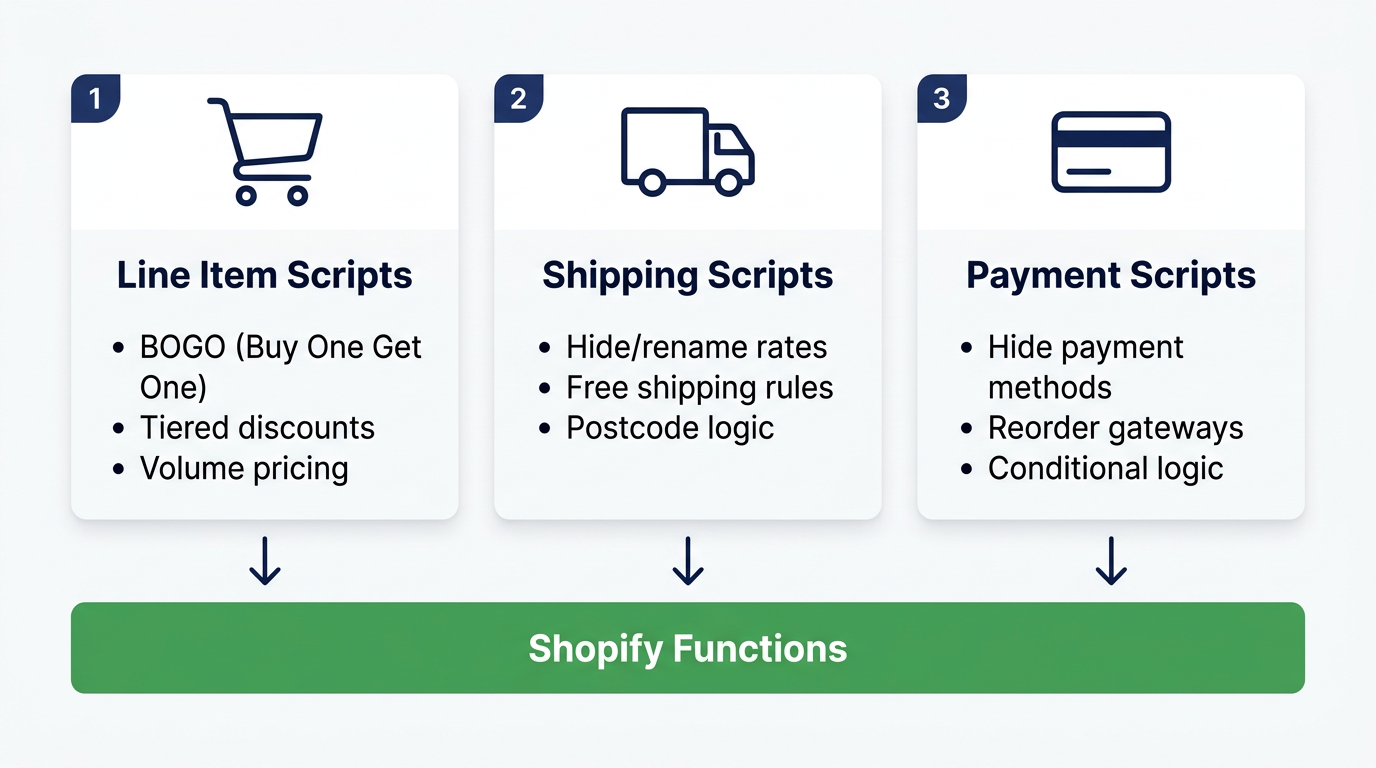
Before you can plan a migration, it helps to understand what your Shopify Scripts are currently doing. There are three types of checkout scripts, each controlling a different part of the checkout experience:
1. Line Item Scripts (Discount Logic)
Line item scripts are the most commonly used. They control pricing and discount behavior in the cart. Common use cases include automatic BOGO deals, tiered discounts based on cart total, volume pricing by quantity, customer-tag-based pricing for VIPs or wholesale accounts, and gift-with-purchase promotions.
2. Shipping Scripts
Shipping scripts let merchants rename, hide, reorder, or discount shipping methods at checkout. Examples include offering free shipping for orders over a threshold, hiding express options for certain postcodes, and offering VIP customers free next-day delivery based on customer tags.
3. Payment Scripts
Payment scripts allow merchants to hide, rename, or reorder payment gateways depending on cart contents, customer location, or order total. A common example is hiding Buy Now Pay Later options for orders below a minimum value, or prioritizing a preferred payment method for high-value orders.
Your Replacement: Shopify Functions
The good news is that everything Shopify Scripts could do, Shopify Functions can do usually better. Functions run as sandboxed WebAssembly modules on Shopify’s own infrastructure. They are faster, more stable under load, and available to merchants on all Shopify plans (not just Plus). The overall developer experience has also improved significantly, with a much cleaner API and better tooling.
There are dedicated Function APIs for each area that these legacy scripts previously handled: the Discount Function API, the Delivery Customization API, and the Payment Customization API. There are also newer APIs like Cart Transform (for bundles) and Checkout Validation that go well beyond what legacy scripts ever offered.
Video: Step-by-step walkthrough of migrating from legacy scripts to Functions.
Scripts vs. Functions What Changes?
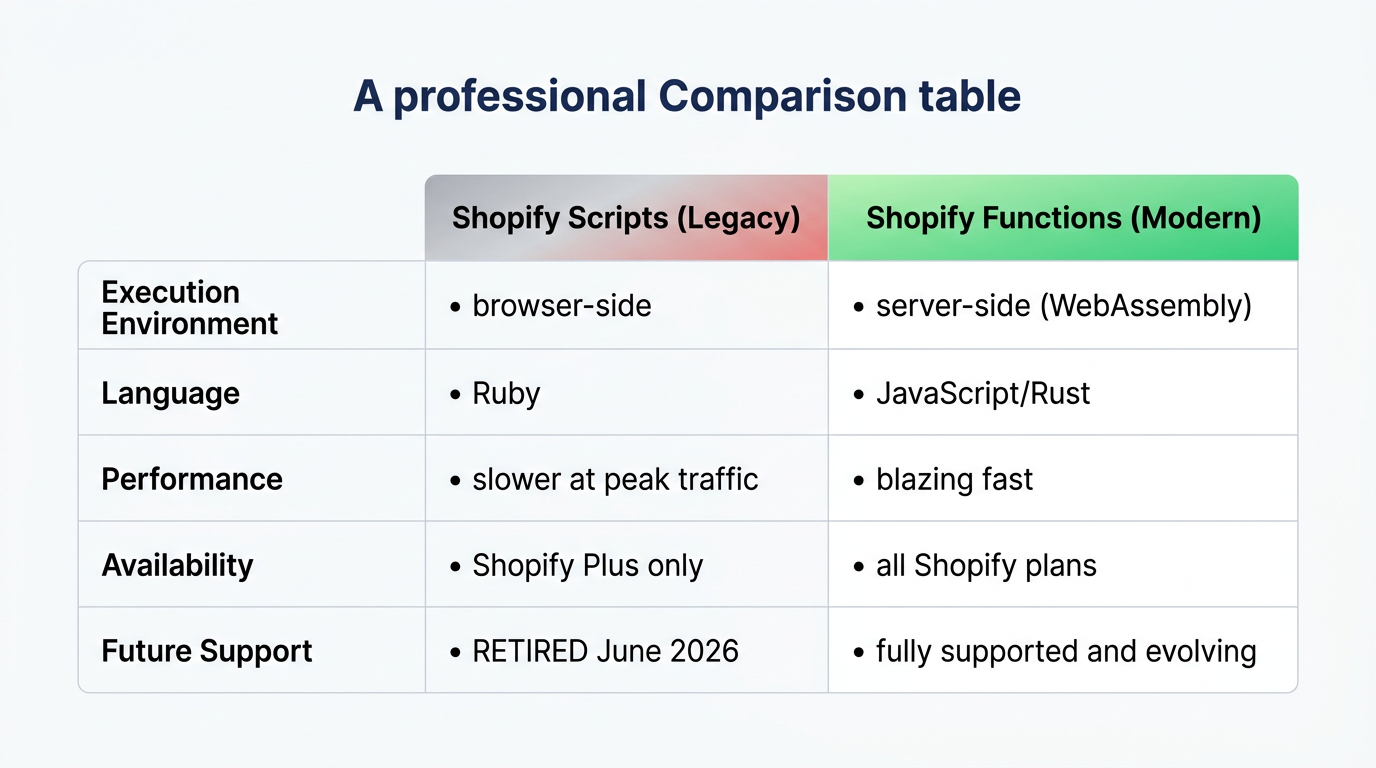
| Feature | Shopify Scripts (Legacy) | Shopify Functions (Modern) |
|---|---|---|
| Language | Ruby | JavaScript / Rust / WebAssembly |
| Execution | Server-side, Script Editor | WebAssembly on Shopify infrastructure |
| Performance | Can lag at peak traffic | Consistently fast, high-scale |
| Plan Availability | Shopify Plus only | All Shopify plans |
| No-Code Options | None requires Ruby dev | Multiple no-code apps available |
| Future Support | Retired June 30, 2026 | Actively developed by Shopify |
Your Step-by-Step Migration Plan
The biggest mistake I see merchants make with this type of platform change is waiting too long and then rushing the migration in a way that causes checkout disruptions. Here is the process I recommend for migrating away from these legacy scripts cleanly and without downtime:
- Step 1 Audit all active Shopify Scripts. Go to your Shopify admin and open the Script Editor app. Document every script that is currently published: what it does, which conditions it checks, and what logic it applies. Shopify also provides a Scripts Customizations Report to help with this.
- Step 2 Map each script to the correct Function API. Line item discount scripts map to the Discount Function API. Shipping scripts map to the Delivery Customization API. Payment scripts map to the Payment Customization API. Checkout validation logic maps to the Cart Validation Function.
- Step 3 Decide: developer build or no-code app? If your scripts are highly custom or complex, a developer build using Shopify CLI and the Functions framework is likely the right approach. For simpler or more common logic (BOGO, tiered discounts, shipping rules), a no-code app will get you there faster. See the section below.
- Step 4 Build and test in a development store first. Never deploy untested checkout logic directly to a live store. Use a Shopify development store to verify that your new Functions replicate the exact behavior of your old scripts.
- Step 5 Run in parallel using customer tags. Before switching off your old scripts entirely, use the parallel testing approach: deploy the new Function but only trigger it for tagged test users in your live store. Your production customers continue to see the existing script logic while you validate the new Function.
- Step 6 Complete the cutover before April 15, 2026. Once validated, unpublish your old scripts and activate your Functions. Do this well before the April 15 freeze date that way, if anything unexpected comes up, you still have a window to troubleshoot.
- Step 7 Monitor checkout closely for the first two weeks. Watch conversion rates, abandonment rates, and any support tickets. Shopify’s Functions observability tools let you track execution logs and errors in real time.
No-Code Apps to Replace Shopify Scripts
Not every merchant who used Shopify Scripts has a developer on hand, and not every use case requires a custom build. There is now a solid ecosystem of no-code and low-code apps built built specifically to replace these scripts with Function-based equivalents. Here are the best options depending on your needs:
| App | Function Types Covered | No-Code | Starting Price | Best For |
|---|---|---|---|---|
| PowerX Functions Creator | All 8 types | Yes | $27.30/mo | Full replacement of all script types |
| SupaEasy: AI Functions Creator | Multiple | AI-assisted | ~$19.99/mo | AI-generated function logic |
| Nexus Functions Creator | Multiple incl. shipping & payment | Yes | ~$19.99/mo | Migration-focused onboarding |
| Function Studio by EasyLogic | Product discounts | Yes | ~$9.99/mo | Simple BOGO / bundles only |
| Function Lab | Discounts (JSON editor) | Partial | Free tier | Developer-preferred JSON control |
One important note: if your scripts handled multiple areas say, both discount logic and shipping customization be careful about choosing a single-category app. Most discount-only apps will not cover your shipping or payment scripts, so you will end up with gaps. The PowerX Functions Creator is currently the only app that covers all eight function types in a single install, which is particularly useful if you are trying to avoid app sprawl.
Need Help Migrating Away From Scripts?
At Ruby Digital Agency, we handle Shopify migrations and platform updates for merchants every day. If your store still relies on legacy scripts and you’re not sure where to start, let’s talk. We will audit your scripts, map them to the right Functions approach, and handle the migration cleanly with zero checkout downtime.Get a Free Migration Assessment
What Happens If You Do Nothing With Shopify Scripts?
This is worth spelling out clearly. If you are still using Shopify Scripts and you do not migrate before June 30, 2026, those scripts will simply stop executing. Your checkout will revert to default Shopify behavior. That means:
- Automatic discounts that depended on legacy scripts will not apply
- Custom shipping logic and rules will disappear
- Payment method customizations will no longer work
- BOGO offers and tiered promotions will break silently at checkout
- Customers may see incorrect pricing or unexpected shipping options
For many Shopify Plus stores, this checkout logic is core to how promotions and checkout flows work. A broken checkout is not just a technical inconvenience it translates directly to lost revenue and customer trust. The migration is mandatory, not optional.
Final Thoughts: Start Now, Not Later
The retirement of Shopify Scripts is one of those platform changes where the merchants who act early will have a smooth transition and the merchants who wait will have a crisis. If your Shopify Scripts are still live today, treat this as a priority. The good news is that Shopify Functions genuinely are better faster, more flexible, and available to all merchants regardless of plan. This migration is not just about compliance with a deadline; it is an opportunity to improve how your checkout logic actually works.
Whether you are planning to handle the migration yourself, use a no-code app, or bring in a Shopify expert to manage it the most important thing right now is to audit your active Shopify Scripts and understand what needs to be replaced. You have until April 15 to finish the work, and until June 30 for the lights to go out on Scripts entirely.
If you need guidance on any part of this process, the official Shopify migration guide is a solid starting point. And if you would rather hand this off to someone who has done it many times before, reach out to us at Ruby Digital Agency we are here to help.
Found this helpful? Share it with other Shopify merchants who might be affected.Share on Facebook Share on X Share on LinkedIn
Related Reading
- Shopify Store Migration Services at Ruby Digital Agency
- Shopify Plus Development & Consulting
- More Shopify Guides on Our Blog
- Contact Us for a Free Shopify Consultation
Lance Allison
Founder & CEO, Ruby Digital Agency
Lance Allison is a Shopify Select Partner and eCommerce migration specialist based in Salt LAke City, Utah. He has helped hundreds of merchants migrate to Shopify and Shopify Plus, and specializes in complex platform transitions and custom Liquid development.