

How to Connect Claude and Shopify: The Complete 2026 Guide to AI Automation and Reporting
Why Claude and Shopify Is a Game-Changer Right Now
If you manage a Shopify store or work with Shopify stores professionally, you already know the grind: writing product descriptions, pulling weekly sales reports, answering customer emails, watching inventory levels, trying to extract actionable insights from Shopify Analytics. I have been in the Shopify ecosystem for over a decade, and when I tell you that the ability to connect Claude and Shopify is one of the most impactful developments I have seen, I am not exaggerating for the sake of a headline.
Claude, the large language model built by Anthropic, is not just another AI chatbot. When properly connected to Shopify, Claude becomes an operational layer that understands your store at a deep level: your products, your customers, your orders, your inventory, your margins. The integration lets you ask Claude plain-language questions about your live store data and get structured, actionable answers in seconds. It lets you automate time-consuming tasks like content generation, customer service drafting, and demand forecasting. And it lets you build workflows that chain multiple operations together without writing much code.
The merchants and agencies that have embraced the Shopify AI automation are seeing measurable results. According to benchmarks from comparable eCommerce deployments, properly implemented AI automation delivers a 48% productivity improvement and a 10.3x ROI within 12 months, with payback typically occurring within the first 90 days. Store owners consistently report saving 15 to 25 hours per week on tasks that previously required manual effort or expensive freelancers. Those hours compound over time into a genuine competitive advantage.
What makes this moment particularly important for the integration is that the infrastructure has matured significantly. As of Q1 2026, Shopify now ships four native MCP (Model Context Protocol) servers and an official AI Toolkit. This is no longer a community experiment or a workaround. The connection between Claude and Shopify is officially supported, well-documented, and continuously improving. The window to get ahead of competitors by implementing it is still open, but it is closing fast.
In this guide, I am going to walk you through every practical method to establish the Claude and Shopify connection — from the free, no-code setup you can complete in about 30 minutes, to the advanced API-level integrations we build for clients at Ruby Digital Agency. Whether you are a store owner looking for smarter automation, a developer wanting to build Shopify-powered AI tools, or an agency owner adding AI services to your offering, this guide gives you everything you need to get started.
Up to date as of May 2026: This guide covers the this integration including the Shopify AI Toolkit (released April 9, 2026), the four native Shopify MCP servers (shipped Q1 2026), and all major no-code and code-based connection methods. I update this guide regularly as the ecosystem evolves.
What Is Claude AI and Why Does It Matter for Shopify Merchants?
Claude is a family of large language models (LLMs) developed by Anthropic, an AI safety company founded in 2021 by former OpenAI researchers. Claude is available through a web app at claude.ai, a Claude Desktop application for Mac and Windows, and through an API for developers building custom integrations. The version of Claude that powers the most capable workflows — the one you want for serious Claude and Shopify automation — is Claude Sonnet or Opus, depending on your plan tier.
What makes Claude particularly well-suited to Shopify integration is a combination of three capabilities that other models do not deliver as consistently:
- A massive context window (up to 200,000 tokens): This means Claude can hold your entire product catalog, months of order history, customer segments, brand guidelines, and policy documents all within a single conversation. Competing models cut out halfway through your data, forcing you to break analysis into smaller chunks and losing the coherence that comes from analyzing everything together.
- Strong analytical reasoning: Claude does not just summarize data — it finds patterns, calculates margins, identifies anomalies, and generates actionable recommendations. This is critical for the reporting side of the Claude and Shopify integration, where you need the AI to actually understand your business metrics, not just echo your data back at you.
- Excellent commercial writing: Product descriptions, email subject lines, customer service replies, marketing copy, SEO-optimized blog posts — Claude generates commerce-focused text that sounds human and converts. When the writing comes from within the context of your actual store data, it is genuinely contextual and brand-consistent in a way that generic AI copy tools cannot match.
There are two Claude products that are most relevant for Shopify merchants and developers:
Claude Desktop (claude.ai): This is the consumer-facing interface. You open it like any app, start a conversation, and attach files or connect it to external tools via MCP. For store owners who want live access to their Shopify data without touching any backend code, Claude Desktop with a Shopify MCP server is the right starting point.
Claude Code: This is the agentic coding assistant that runs in your terminal. It has deep, native MCP support and is the primary target of Shopify’s official AI Toolkit. Developers and technical agency owners use Claude Code for building Shopify apps, running bulk store operations, validating GraphQL queries, and executing complex automation workflows. When developers discuss enterprise-level Claude and Shopify integration, Claude Code is usually the tool in question.
For the majority of this guide, I will cover both paths — the store-owner-friendly Claude Desktop approach and the developer-focused Claude Code approach. You do not need to be a programmer to get significant value from the Claude and Shopify integration, but understanding that both tiers exist will help you choose the right setup for your needs.
Why Claude and Shopify Work So Well Together

Not every AI model pairs well with every platform, but the combination of Claude and Shopify hits a sweet spot that I have not seen replicated anywhere else in the eCommerce AI landscape. Here is why the integration between Claude and Shopify delivers results that feel qualitatively different from other AI-augmented workflows.
Shopify’s data architecture is genuinely AI-friendly. Shopify exposes a rich, well-structured GraphQL Admin API that covers products, variants, orders, customers, inventory, metafields, analytics, fulfillments, discounts, and collections. This is not a messy, undocumented data dump — it is a clean, queryable database that Claude can navigate intelligently. When you connect Claude and Shopify through MCP, Claude is not guessing what your store data looks like. It is querying a structured API with real-time responses.
Claude’s context window makes whole-catalog analysis possible. Most AI tools force you to work with data in chunks because their context windows are too small to hold a full store dataset. this integration solves that problem entirely. You can paste your entire product catalog, six months of order data, and your brand guidelines into a single Claude conversation and ask complex cross-referencing questions that require holding all of that information simultaneously. “Which products are frequently bought together, and do any of those pairs have low stock that might cause a bundling opportunity to be missed?” That kind of multi-dimensional question requires the kind of context window that Claude uniquely provides.
Claude writes commerce copy that converts. There is a meaningful difference between AI-generated text that sounds generic and AI-generated text that feels specific and relevant. When Claude and Shopify are connected and Claude has live access to your actual product details, pricing, customer reviews, and catalog context, the copy it generates is rooted in reality. A product description for your store is not a template — it references your real specifications, differentiates from similar items in your catalog, and incorporates the customer language your reviews surface. That specificity is what makes Claude and Shopify-generated content genuinely useful rather than just adequate.
Shopify now officially supports MCP. The Claude and Shopify integration is not a community hack built on undocumented endpoints. As of Q1 2026, Shopify ships four native MCP servers (Storefront, Customer Account, Checkout, and Dev MCP) and an official AI Toolkit. Shopify is actively investing in making the connection between Claude and Shopify better, which means the integration will only improve over time. You are building on a supported, documented foundation.
The use case coverage is unusually broad. Some AI integrations are useful for one or two narrow tasks and then hit a wall. The range of valuable applications for Claude and Shopify spans product content, customer service, data analysis, reporting, inventory management, pricing strategy, SEO, email marketing, fraud detection, and custom app development. A single integration delivers value across your entire Shopify operation rather than solving one isolated problem.
Understanding MCP: The Bridge Between Claude and Shopify
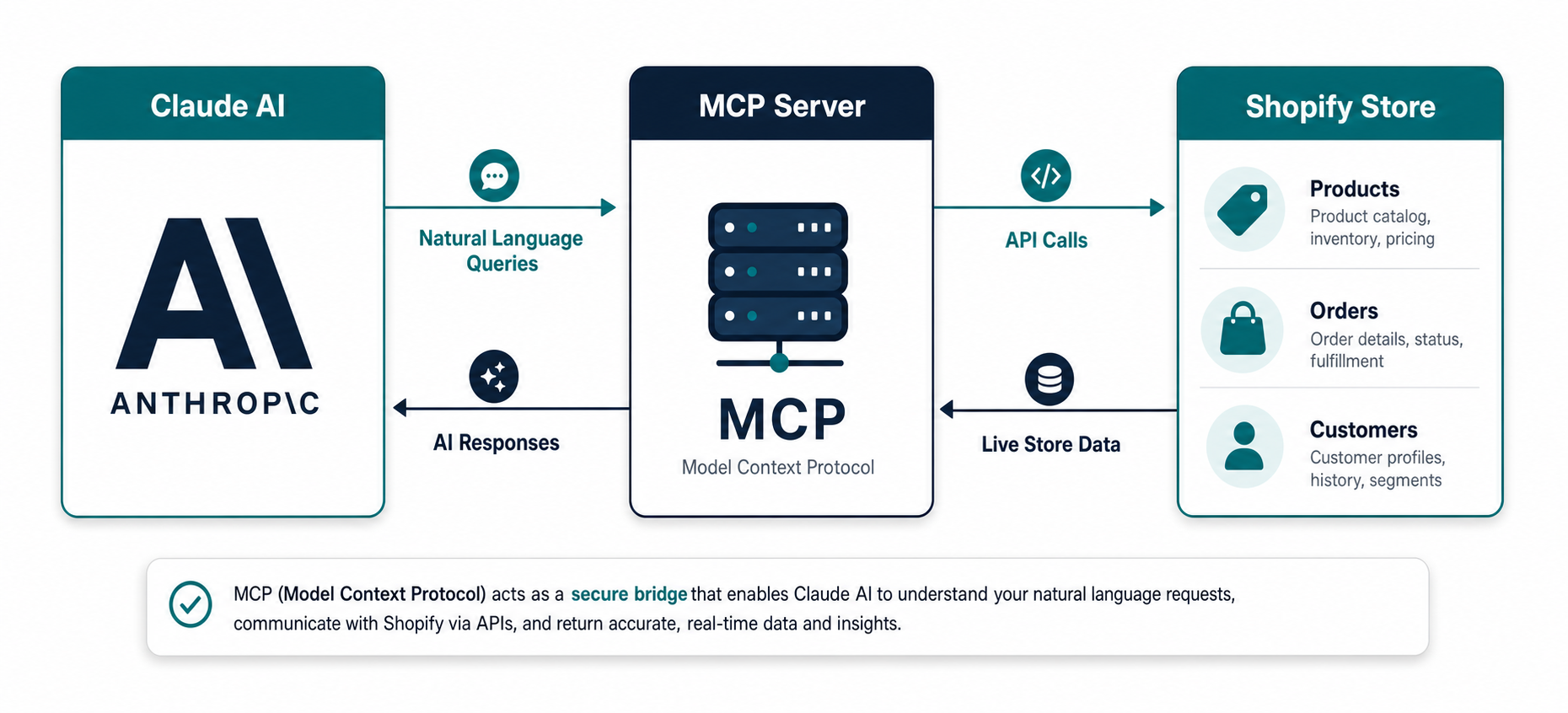
If you want to understand how the Claude and Shopify integration actually works under the hood, you need to understand MCP — Model Context Protocol. Developed by Anthropic as an open standard, MCP is a specification for how AI models can securely connect to external tools, data sources, and services. Think of it as the plumbing that allows Claude to reach out and interact with systems beyond its training data.
Before MCP, connecting Claude and Shopify meant a manual, time-consuming process: export a CSV from Shopify Analytics, clean the data, upload it to claude.ai, wait for Claude to process it, ask your questions, then start over the next time you needed fresh data. It worked as a proof of concept, but it was fundamentally working with stale snapshots rather than live information. And it certainly could not perform write operations — updating products, managing collections, or processing orders.
With MCP, the the AI-to-store relationship becomes dynamic. Claude can query your store’s current state, receive real-time responses, chain multiple operations together, and execute changes — all within a single, continuous conversation. You ask a question in natural language, Claude translates that into the appropriate Shopify Admin API calls, receives the structured data back, reasons about it in the context of your conversation, and responds in plain English. The entire cycle happens in seconds.
The Four Native Shopify MCP Servers
As of Q1 2026, Shopify ships four native MCP servers that give AI agents structured access to different aspects of store operations. Understanding which server handles which part of the Claude and Shopify connection helps you set up the right integration for your needs.
| MCP Server | What It Covers | Who It’s For | How to Enable |
|---|---|---|---|
| Storefront MCP | Product catalog, inventory, pricing, policies, FAQs, search | All Shopify Plus stores | On by default after March 2026 |
| Customer Account MCP | Authenticated customer sessions, order history, account management | Shopify Plus | Admin → Settings → Agentic Commerce |
| Checkout MCP | Cart creation, checkout flow, order completion | Shopify Plus | Admin → Settings → Agentic Commerce |
| Dev MCP | Live docs, GraphQL schema, Liquid validation, CLI operations | Developers and agencies | Ships with Shopify AI Toolkit |
There is an important distinction to understand here. The four native Shopify MCP servers are designed for specific use cases: Storefront, Customer Account, and Checkout MCP are primarily for building AI-powered shopping experiences and are available to Shopify Plus merchants. The Dev MCP is for development workflows using the Shopify AI Toolkit with Claude Code.
For the most common use case — a store owner or developer connecting Claude and Shopify to get full Admin API access for automation, reporting, and operations — the community-built shopify-mcp Node.js package is the right tool. This package gives Claude access to your entire Admin API: products, orders, customers, inventory, collections, metafields, and analytics. It is open source, MIT-licensed, and actively maintained. Method 1 in this guide covers the full setup using this approach.
How the MCP Connection Works Step-by-Step
When you have the Claude and Shopify MCP connection set up, here is what happens when you ask Claude a question about your store:
- You type a natural language query in Claude Desktop: “What are my top 5 products by revenue this month?”
- Claude interprets the query and determines which MCP tool to call — in this case, the
get-ordersorsearch-productstool with the appropriate parameters - The MCP server sends an authenticated API request to your Shopify store’s Admin API using your stored access token
- Shopify returns structured JSON data containing the relevant orders and revenue figures
- Claude receives this data within its conversation context, reasons about it, and formulates a clear, plain-English response
- You see the result: a ranked list of your top products with revenue figures, presented as part of the ongoing conversation
This entire cycle typically takes 3 to 10 seconds, depending on how much data is being retrieved. The result is a fundamentally different experience from static dashboards or manual data exports. The Claude and Shopify MCP integration is interactive, real-time, and conversational in a way that traditional analytics tools simply cannot match.
Watch: Claude Can Now Do Everything on Shopify
Before diving into the setup steps, watch this hands-on overview of the Claude and Shopify integration running a fully automated store workflow. This gives you a clear picture of what the finished integration looks like in practice.
Choosing the Right Method to Connect Claude and Shopify
There are five main ways to connect Claude and Shopify, ranging from a free 30-minute setup to a fully custom development engagement. The right choice depends on your technical comfort level, your budget, and the specific workflows you want to automate. Here is a clear comparison before we go deep on each method:
| Method | Technical Level | Monthly Cost | Best For |
|---|---|---|---|
| 1. Claude Desktop + MCP | Beginner | Free + Claude Pro ($20) | Store owners, quick setup |
| 2. Shopify AI Toolkit | Intermediate | Claude API billing | Developers, app builders |
| 3. Zapier | Beginner | $20–$65 | No-code workflow automation |
| 4. Windsor.ai / n8n | Intermediate | Free–$50 | Advanced analytics, multi-channel |
| 5. Direct API | Advanced | Usage-based | Custom apps, enterprise workflows |
If you are not sure where to start, I recommend Method 1. It delivers the core Claude and Shopify experience — live store data, natural language queries, real-time insights — without requiring a development background. You can always upgrade to more advanced methods once you understand what value the integration delivers for your specific workflows.
Method 1: Connect Claude Desktop to Shopify via MCP (Free, No-Code)
This is the method I recommend as the starting point for most store owners and non-technical merchants exploring the Claude and Shopify integration. It requires editing a single JSON file — not writing code — and can be completed in about 30 minutes. The end result is Claude Desktop with live read and write access to your Shopify store through a running MCP server on your computer.
Prerequisites: Claude Desktop app (free download from claude.ai/download), a Claude Pro or Max subscription ($20+/month), Node.js version 18 or higher on your machine, and admin access to your Shopify store. That’s it.
1 Create a Shopify Custom App and Get Your Access Token
The foundation of the Claude and Shopify MCP connection is a dedicated custom app in your Shopify admin. This app generates a permanent, secure access token that the MCP server uses to authenticate with your store’s Admin API on behalf of Claude.
- Log in to your Shopify Admin and go to Settings
- Click Apps and sales channels
- Click Develop apps (if prompted, click Allow custom app development to enable this feature)
- Click Create an app
- Name it something descriptive like “Claude MCP Integration” and enter your email
- Click Configure Admin API scopes
- Select the scopes that match what you want the Claude and Shopify integration to do. At minimum, enable:
read_products— view product catalogread_ordersandread_all_orders— access full order historyread_customers— customer analyticsread_inventory— inventory levelsread_analytics— store metrics
- If you want Claude to be able to update products, add
write_products. For customer service workflows, addwrite_draft_orders. - Click Save, then navigate to the API credentials tab
- Click Install app, then confirm
- Critical: The Admin API access token is displayed exactly once. Click Reveal token, copy it immediately, and store it in a password manager. The token begins with
shpat_. If you miss this step, you will need to uninstall and reinstall the app.
Security reminder: Your Shopify Admin API access token is a permanent, store-specific credential. Never commit it to a public repository, store it in a plain text file, or share it in any communication channel. Treat it exactly like your Shopify admin password.
2 Install Node.js (If You Do Not Have It)
The shopify-mcp package runs on Node.js. Open a terminal (Mac: Command + Space, type Terminal; Windows: Windows key, type cmd) and run:
node --versionIf you see a version number like v20.11.0, you are ready. If you get “command not found”, download and install Node.js 18 or higher from nodejs.org. After installing, restart your computer before continuing.
3 Configure Claude Desktop
Now connect Claude and Shopify by editing the Claude Desktop configuration file. This file tells Claude Desktop where to find your MCP server and how to authenticate with Shopify.
File location:
- macOS:
~/Library/Application Support/Claude/claude_desktop_config.json - Windows:
%APPDATA%\Claude\claude_desktop_config.json
Open the file in any text editor (TextEdit on Mac, Notepad on Windows). If it does not exist, create it. Add or update it with this configuration:
{
  "mcpServers": {
    "shopify": {
      "command": "npx",
      "args": [
        "shopify-mcp",
        "--accessToken",
        "shpat_YOUR_TOKEN_HERE",
        "--domain",
        "your-store.myshopify.com"
      ]
    }
  }
}
Replace shpat_YOUR_TOKEN_HERE with your actual token and your-store.myshopify.com with your store’s myshopify.com subdomain (not your custom domain). Save the file.
4 Restart Claude Desktop and Verify the Connection
Fully quit Claude Desktop — on Mac, right-click the dock icon and select Quit; on Windows, right-click the taskbar icon and close. Relaunch it. In a new conversation, you should see a tools indicator confirming MCP tools are active. Test the Claude and Shopify connection with a few queries:
- “List my 5 most recent orders with their total values and fulfillment status.”
- “How many products do I currently have in each collection?”
- “What is my inventory level for [product name]?”
If Claude returns accurate, real-time data from your store, the the MCP connection is live and working. You now have a live AI assistant with direct visibility into your store operations. From here, you can explore any of the automation and reporting workflows covered later in this guide.
Method 2: Shopify AI Toolkit + Claude Code (For Developers and Agencies)
The Shopify AI Toolkit, released April 9, 2026, is the officially supported, developer-focused method for connecting this integration at scale. This is the method we use at Ruby Digital Agency for client work because it gives Claude Code access to Shopify’s live documentation, real-time GraphQL schema validation, Liquid template validation, and full CLI-driven store operations in a single, unified interface.
The Shopify AI Toolkit wraps Shopify’s Dev MCP Server into auto-updating plugins for Claude Code. The practical impact is that Claude never generates outdated Liquid syntax or calls GraphQL fields that do not exist — it validates against the actual live schema on every query. For developers who have spent time debugging “field does not exist” API errors or fixing deprecated Liquid tags, the difference is immediately noticeable.
Quick Install: One Command to Connect Claude and Shopify
Setting up the Shopify AI Toolkit for Claude Code takes exactly one terminal command:
claude mcp add --transport stdio shopify-dev-mcp -- npx -y @shopify/dev-mcp@latestRestart Claude Code after running this command. The toolkit installs and auto-updates going forward. To authenticate with a specific Shopify store for live operations:
shopify auth loginAlternatively, if you are using a supported IDE plugin (VS Code, Cursor, JetBrains), you can install the Shopify AI Toolkit directly from the plugin marketplace:
/plugin marketplace add Shopify/shopify-ai-toolkitWhat the Shopify AI Toolkit Adds to Claude and Shopify
Once installed, the Claude and Shopify AI Toolkit connection adds seven specific tools to Claude Code:
- Real-time Shopify developer documentation search
- GraphQL schema validation for Storefront, Checkout, and Catalog APIs
- Liquid template validation without requiring a dev store
- Shopify CLI command execution through natural language
- Product creation, metafield management, and theme file modification
- Bulk operation execution with schema pre-validation
- Partner account context for multi-store management
The developer experience improvement from this setup is substantial. Instead of switching between Shopify API docs, a GraphQL explorer, your code editor, and a terminal, Claude Code handles all of that context within a single conversation. You describe what you need in plain English, Claude Code looks up the correct API, writes the query, validates it against the live schema, and executes it. The Claude and Shopify AI Toolkit is the right choice for anyone building Shopify apps, building custom automation scripts, or managing multiple Shopify stores professionally.
Method 3: Zapier Integration (True No-Code Automation)
Zapier’s native integration for Shopify and Anthropic (Claude) is the most accessible way to automate these workflows without any technical setup. If you are already using Zapier in your business, adding Claude to your Shopify automation stack is as simple as connecting two accounts and choosing trigger-action pairs from a visual interface.
The key difference between Zapier and the MCP-based Claude and Shopify connection is the nature of the automation. Zapier creates one-directional, event-driven workflows: when X happens in Shopify, send data to Claude, then do Y with Claude’s response. The MCP approach is interactive and conversational. Choose Zapier when you want set-and-forget automations that run without any human prompting. Choose MCP when you want an on-demand Claude and Shopify dialogue that you drive in real time.
Practical practical automation zaps That Deliver Immediate Value
- New order → Claude draft confirmation email: Sends order details to Claude, which writes a personalized confirmation email for team review before sending
- Customer refund request → Claude policy-compliant reply: Passes the customer message and your return policy to Claude, which drafts a compliant, empathetic response
- Weekly Monday trigger → Claude sales analysis report: Every Monday, exports the previous week’s Shopify data, sends to Claude for narrative analysis, emails the report to your team
- New product added with blank description → Claude generates SEO copy: Automatically writes an optimized product description whenever a new SKU is added without one
- Low inventory alert → Claude reorder request email: Drafts a supplier reorder email with the correct SKU, quantity, and urgency context based on your sales velocity data
Zapier handles all authentication for the Claude and Shopify connection — no config files, no tokens to manage, no terminal commands. You authenticate both accounts through standard OAuth and start building. Zapier plans that support Claude integration start at around $20 per month.
Method 4: Windsor.ai and n8n for Advanced Analytics
For merchants who need the Claude and Shopify connection to extend beyond store data into multi-channel analytics, Windsor.ai is one of the most powerful options available. Windsor uses its own MCP server to create a live bridge between Shopify and Claude, and it simultaneously connects over 325 other data sources: Google Analytics, Meta Ads, Google Ads, email marketing platforms, and more. This means your AI conversations about your store can include blended ROAS analysis, customer acquisition cost by channel, and lifetime value correlations across platforms — all in a single natural language query.
n8n is an open-source workflow automation platform that supports both Claude and Shopify as first-class nodes. It is self-hostable (free tier available) and significantly more flexible than Zapier for complex multi-step Claude and Shopify workflows that require conditional logic, data transformation, error handling, or custom code execution within the automation chain. The learning curve is steeper, but the ceiling is much higher for technical users who want full control over their automation architecture.
Method 5: Direct Claude API Integration (Custom Development)
When no off-the-shelf solution meets your requirements, a custom Claude and Shopify integration built directly on Claude’s API and Shopify’s GraphQL Admin API is the answer. This is the right choice for merchants and brands that need a customer-facing AI chatbot powered by live store data, bulk operations across thousands of products, or complex autonomous workflows that chain multiple business logic steps together.
Shopify provides an official reference implementation called shop-chat-agent on GitHub that gives developers a solid starting point for custom store AI agents. Building on this foundation, a capable developer can create a fully branded Claude and Shopify chat experience that lives on your storefront, understands your entire product catalog, and handles customer queries with the accuracy of someone who knows your store intimately.
Custom custom development at this level typically runs $4,000 to $18,000 upfront depending on scope, with ongoing maintenance costs. For high-volume stores where the automation replaces significant labor cost, the ROI calculation is straightforward. At Ruby Digital Agency, we assess the business case before recommending this level of investment, but for the right store it is among the highest-leverage infrastructure you can build in 2026.
AI-Powered Reporting with Claude and Shopify
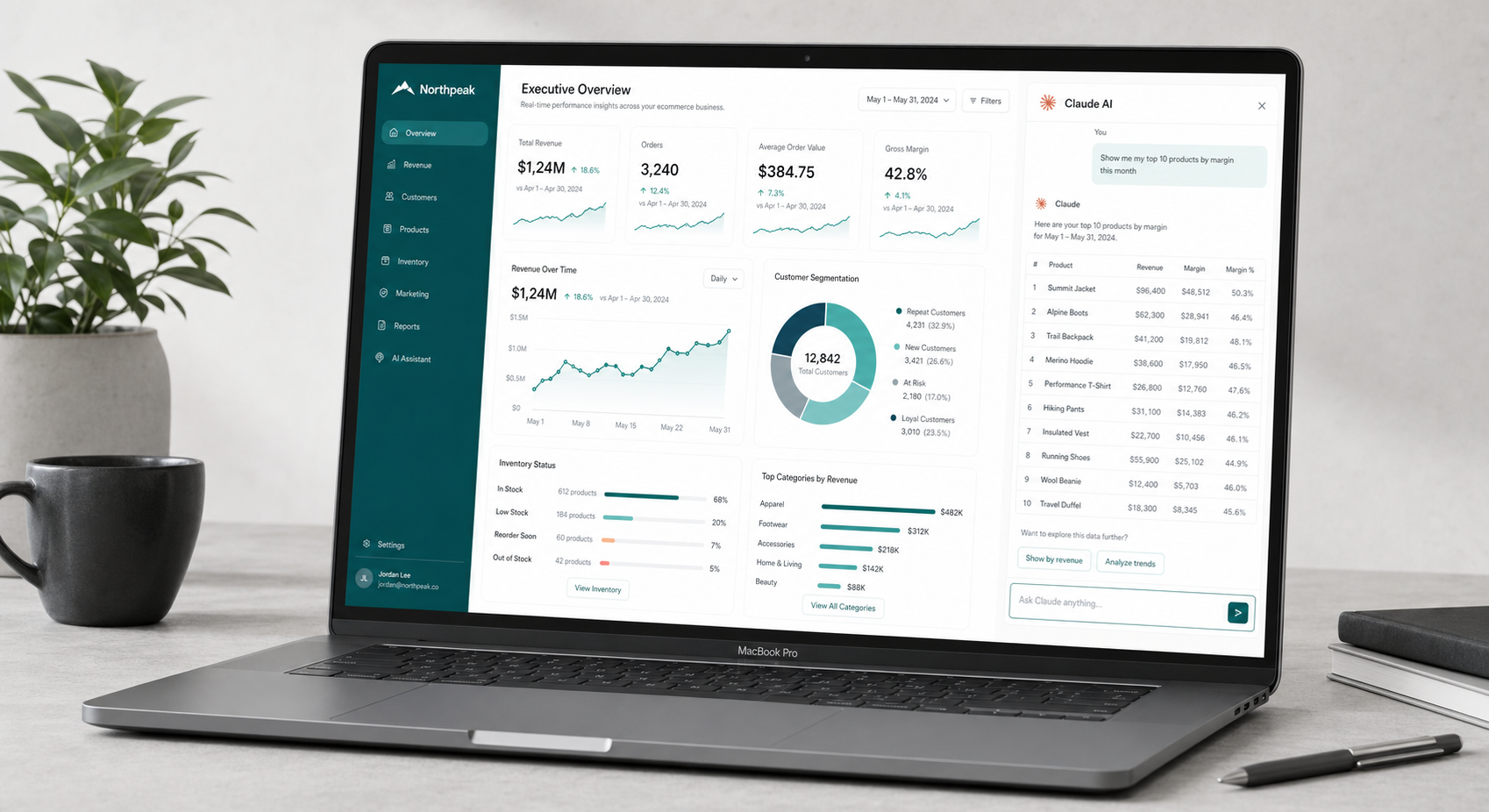
One of the most immediately high-value applications of the the AI-to-store integration is reporting. Shopify’s native analytics are genuinely useful, but they are constrained to pre-built report templates. You can see what Shopify decided you should see, in the format Shopify decided to show it. The the combination blows that model open. Once connected, you have a natural language interface to your entire store dataset — ask anything, drill down however deep you need, and get the answer formatted exactly the way your business requires.
Revenue and Profitability Analysis
Standard Shopify reports show revenue, orders, and average order value. The the reporting setup goes further by letting you ask about true economics:
- “Calculate my real margin per product after Shopify fees (2.9% + 30 cents per transaction), estimated shipping cost ($4.50 average), and COGS. Show me the 10 highest-margin SKUs.”
- “What is my revenue trend for the past 12 months? Is it accelerating or decelerating, and which product categories are driving the change?”
- “Compare Q1 2026 to Q1 2025. Identify the three biggest revenue drivers and three biggest declines.”
- “At my current run rate, project this quarter’s revenue and tell me how far above or below I am from the same quarter last year.”
Customer Segmentation and Lifetime Value
Customer analytics is an area where the this integration delivers insights that Shopify’s built-in tools simply do not surface. With the right prompts, you can turn your raw customer data into strategic intelligence:
- “Segment my customers into tiers: VIP (5+ orders or $500+ LTV), Loyal (2–4 orders), Single Purchase, and Lapsed (90+ days no order). How many are in each segment and what is the LTV for each tier?”
- “What is the average time between a customer’s first and second order? Which product categories most commonly trigger a second purchase?”
- “Identify customers who typically order every 30 days but have not ordered in 60+ days. Generate a win-back email list.”
Inventory and Demand Forecasting
the combination can approximate inventory planning capabilities that typically require dedicated software:
- “Based on my 30-day sales velocity, which products will hit zero stock in the next 14 days? Rank by urgency.”
- “Looking at last year’s data, which months see spikes in [product category] sales? What should my pre-season reorder quantities look like?”
- “Which SKUs are consistently backordered or out-of-stock? Estimate the lost revenue based on average daily sales velocity during stockout periods.”
Getting Started with Reports Without MCP
If you are not yet set up with the full MCP-based Claude and Shopify connection, you can still run powerful reports by exporting Shopify CSVs and uploading them to claude.ai. Export your orders CSV, customers CSV, and products CSV from the Shopify admin, upload all three to a single Claude conversation, and ask your analytical questions across the combined dataset. This gives you this analytics experience without any server setup — just accept that the data is a snapshot, not live.
Top Claude and Shopify Automation Use Cases in 2026
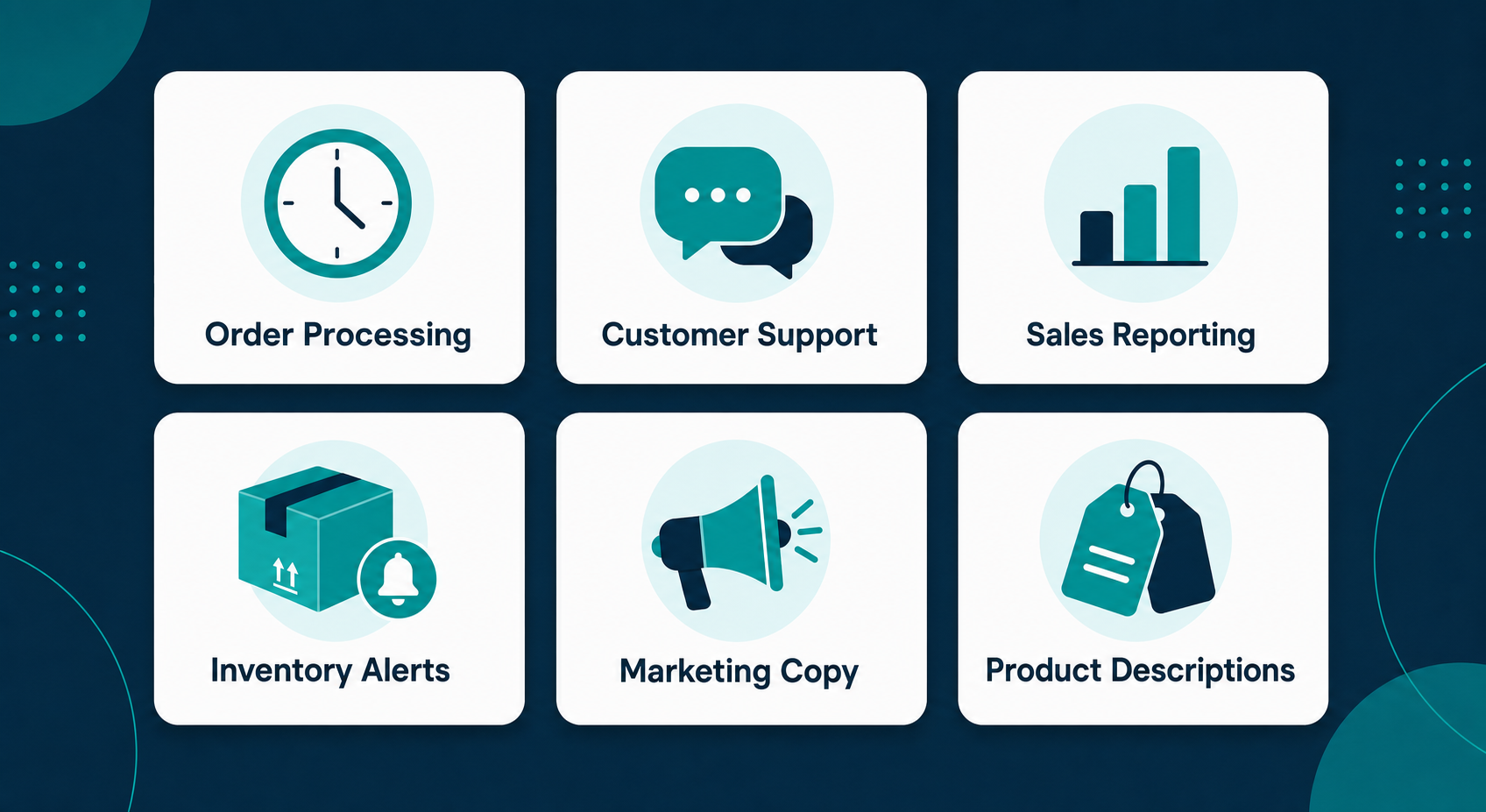
Beyond reporting, the the integration opens up a broad range of automation opportunities across store operations. These are the use cases delivering the most consistent value for merchants in 2026.
1. Batch Product Description Writing
For stores with large catalogs, product content is one of the biggest time sinks. The this integration handles product content exceptionally well because Claude can maintain consistent voice across an entire catalog while referencing real product data. Feed Claude your full product spreadsheet with specs, materials, target keywords, and selling points, then ask it to generate descriptions for every SKU maintaining consistent tone and avoiding repetitive phrasing across similar items. A typical an AI-powered product content workflow processes 100 products in 2 to 3 hours, producing descriptions that need only light editing before publishing.
2. Customer Service Drafting
Order status inquiries account for 30 to 40% of inbound customer emails at most Shopify stores. With the Claude and Shopify MCP connection, you can build workflows that pull order details from Shopify, pass them to Claude along with the customer’s email, and generate a complete draft reply in under 10 seconds. A team member reviews and sends the draft. Response time drops from hours to minutes; time spent per ticket drops from 8 minutes to under 2. Refund requests, shipping questions, return initiation — the AI handles the drafting for all of it.
3. Competitive Pricing Analysis
Claude Code with the the Claude Code Shopify toolkit can build and run automated competitor price monitoring workflows. Define the competitor URLs, the target SKUs, and your margin floors. Claude Code scrapes the competitor data, compares it to your Shopify pricing, and generates a report showing where you are over-priced, under-priced, or well-positioned. For stores in competitive categories, this level of pricing intelligence — done manually — is practically impossible at any useful frequency.
4. SEO Content and Blog Generation
the AI connected to your store can generate full blog posts rooted in your actual product catalog and optimized for target keywords. Ask: “Write a 1,500-word buyer’s guide for [product category] that incorporates our top 5 products, links to their collection pages, and targets the keyword phrase [search term].” The result references your real products with accurate descriptions, creating SEO content that is meaningfully more specific than generic AI content generated without store context.
5. Email Marketing Personalization
Use the the AI-powered customer segmentation analysis to feed personalized email sequences. A win-back email for a lapsed VIP customer can reference the specific products they purchased, suggest logical follow-on items based on their purchase history, and use language calibrated to a high-value customer relationship. the two tools make genuine personalization at scale achievable without a dedicated email marketing analyst.
6. Weekly Store Health Reports
Set up a recurring workflow (via Zapier, n8n, or a scheduled script) that exports key Shopify metrics every Monday morning, sends the data to Claude for analysis, and emails a plain-language store health summary to your leadership team. The report covers the key questions every week: revenue vs. target, top performing products, flagged inventory issues, customer service volume, and top-line trends. this AI integration turns raw data exports into board-ready narrative summaries in seconds.
Advanced Claude and Shopify Workflows: Chaining Automations
The individual the use cases above are valuable on their own. But the real compound benefit comes from chaining them together into connected workflows where the output of one automation feeds the input of the next.
Here is an example of a chained Claude and Shopify workflow that our agency has built for a client in the consumer goods space:
- Weekly inventory scan: Claude queries the Shopify Admin API for all products below a defined stock threshold relative to their 30-day sales velocity
- Demand forecast: Claude cross-references the low-stock products with seasonal sales data from the same period last year to prioritize which items need emergency reorders versus routine replenishment
- Supplier email drafting: For each priority reorder, Claude drafts a purchase order email to the relevant supplier with the correct SKU, quantity, and requested delivery date
- Internal summary: Claude generates a plain-English reorder summary and emails it to the operations manager for approval
- Shopify update: After approval, Claude updates the expected availability dates on affected product pages via the Shopify Admin API
This entire chain runs weekly, takes under 5 minutes of human time for review and approval, and previously consumed about 4 hours of manual work. That is the power of the integration at its most mature: not individual tasks automated in isolation, but entire operational processes running with minimal human intervention. Each step in the chain uses together in a way that would be difficult or impossible to automate with traditional rule-based tools, because each step requires contextual judgment that only an AI can provide.
Best Practices and Security for Claude and Shopify

Getting the most value from the this integration requires thoughtful setup. Here are the principles I apply at Ruby Digital Agency for every client deployment.
Security Fundamentals
- Principle of least privilege: Grant only the API scopes your this integration actually needs. If you are using it purely for reporting, there is no reason to enable write access. Start minimal, add scopes intentionally as your workflows require them.
- Secure token storage: Store your Shopify API access token in a password manager (1Password, Bitwarden, or Dashlane). Never in a plain text file, never in a shared document, never pasted into any chat or ticket system.
- Periodic token rotation: As a security hygiene practice, rotate your Admin API access token every 6 to 12 months. This is done by uninstalling and reinstalling your Shopify custom app to generate a fresh token.
- Audit write operations: When using the the integration for write operations — updating product descriptions, managing collections, creating draft orders — always confirm the proposed changes before allowing Claude to execute them. Most MCP configurations prompt for confirmation on write operations by default.
- Customer data handling: If you grant
read_customersscope in your Claude and Shopify setup, that customer PII is transmitted to Anthropic for processing. Review Anthropic’s data handling policies and ensure this aligns with your privacy policy, GDPR obligations, and CCPA requirements before enabling customer data access.
Getting Better Outputs from Claude and Shopify
- Provide rich context upfront: The the integration returns better outputs when you give Claude context about your business. In your first message each session, briefly explain your store type, primary customer profile, and what you are trying to accomplish. “I run a DTC skincare brand targeting women 35-55, mostly repeat buyers. I want to analyze this quarter’s retention metrics.”
- Request structured outputs: Ask Claude to return data as markdown tables, numbered lists, or specific formats your team can use directly. “Return this as a table with columns for SKU, Revenue, Units, Margin, and recommended action.”
- Build a system prompt library: For recurring Claude and Shopify tasks, write and save system prompts that encode your store context, brand voice, and reporting preferences. Reusing a well-crafted system prompt saves the setup time of re-explaining context every session.
- Iterate the conversation: Do not treat the the integration as a one-shot tool. Start with a broad question, then follow up with “drill down on the top 3”, “explain why that might be happening”, or “what would you recommend I do about this?” The conversational depth is where the real analytical value lives.
Troubleshooting Common Claude and Shopify Setup Issues
The the MCP setup is generally smooth, but here are the issues that come up most often and exactly how to resolve them.
MCP Tools Do Not Appear in Claude Desktop After Setup
Symptom: No tool/hammer icon appears in Claude Desktop after configuring the claude_desktop_config.json file.
Fix: First, ensure you fully quit and relaunched Claude Desktop (just closing the window is not enough on Mac). Second, validate your JSON configuration for syntax errors — a single misplaced comma or unclosed bracket will silently prevent the config from loading. Paste your config into jsonlint.com to check for syntax issues. Third, confirm Node.js is installed and accessible by running node --version in a terminal.
Authentication Errors (401 Unauthorized)
Symptom: The Claude and Shopify connection is recognized but returns 401 errors when querying data.
Fix: Verify your access token is correct and begins with shpat_. Confirm the custom app is installed on the store (not just created). If you did not copy the token immediately after installation, you need to uninstall and reinstall the custom app to generate a new one. Double-check your myshopify.com domain in the config — it should not include https://.
Data Returns for a Different Store
Symptom: Claude returns data but it does not match your store.
Fix: Verify the --domain parameter uses the correct myshopify.com subdomain, not your custom storefront domain. Confirm the access token in your config corresponds to the app installed on that specific store.
npx Command Not Found
Symptom: Claude Desktop logs show “npx not found” or similar Node.js path errors.
Fix: Node.js is either not installed or its bin directory is not in your system PATH. Install Node.js 18+ from nodejs.org, restart your computer, and verify with node --version and npx --version before attempting the Claude and Shopify connection again.
Permission Denied for Specific Data
Symptom: Claude can read some data but returns permission errors for orders, customers, or analytics.
Fix: Return to your Shopify Admin, go to your custom app’s Configuration tab, and add the missing API scopes. After saving, reinstall the app (API credentials tab → Install app) to apply the updated scopes to your access token.
Real Prompts to Copy and Use Right Now
One of the things I hear most from people who have just set up their Shopify store with MCP access is: “I know it’s connected, but I am not sure what to ask.” So here is a practical library of prompts that deliver immediate value. These are organized by business function and ready to paste into your Claude and Shopify session right away.
Revenue and Sales Analysis Prompts
- “Pull my order data from the past 30 days and calculate total revenue, average order value, total number of orders, and the day of the week with the highest order volume.”
- “Identify my top 10 best-selling products by total units sold this quarter and compare them to the same quarter last year. Note which ones are growing, which are declining, and which are new.”
- “What percentage of my orders in the past 90 days included more than one product? What product combinations appear most frequently together in the same order?”
- “Calculate my average order value by traffic source if that data is available. If not, break it down by discount code usage versus non-discounted orders.”
Product Content Prompts
- “Pull my 20 products with the shortest or weakest descriptions. Rewrite each one to be 150–200 words, focusing on the key benefit and sensory language. Use a direct, confident tone that matches a premium brand. Do not use the phrase ‘perfect for’.”
- “Review my product titles and identify any that are unclear, too generic, or missing important variants in the title itself. Suggest improved titles.”
- “Pull all products in [collection name]. Write collection page copy that introduces the category, highlights the three best sellers, and closes with a call to action. Target 200–300 words.”
Customer Service Prompts
- “A customer has emailed asking about the status of order #[number]. Pull that order from Shopify and draft a reply that includes the current fulfillment status, tracking information if available, and an estimated delivery date based on the carrier. Keep the tone warm and professional.”
- “A customer wants to return a product they purchased 42 days ago. Our policy is 30-day returns. Draft a reply that acknowledges their request, politely explains the policy, and offers a goodwill gesture of a 15% discount on their next order.”
- “Write an FAQ page for my store covering our top 10 most common customer questions. Base the answers on my current store policies. Keep each answer under 100 words.”
Inventory and Operations Prompts
- “Pull my current inventory levels for all active products. Flag any product that has 10 or fewer units remaining and has sold at least 5 units in the past 14 days. List them in order of urgency.”
- “Review my order fulfillment data from the past 60 days. What is my average time from order to fulfillment? Are there specific days of the week or product types where fulfillment is consistently slower?”
- “Which products have I set as active in Shopify but have not sold a single unit in the past 90 days? Should I consider archiving or discounting any of them?”
Reporting Prompts for Weekly Standups
- “Generate a weekly store health summary for [date range]. Include: total revenue, order count, new customers, repeat customers, top 3 products by revenue, and one notable trend or anomaly.”
- “Compare this week to last week and to the same week last year. Format the comparison as a table. Highlight any metric that changed by more than 15% in either direction.”
Sharing Your Claude and Shopify Journey on Social Media
Since you are reading this and have made it this far, there is a good chance you are someone who creates content around eCommerce, Shopify, or digital marketing. If that is you, here is a practical observation: the Claude and Shopify integration is generating a lot of interest right now, and if you document your journey implementing it, your audience will respond.
Content that tends to perform well for Shopify-adjacent audiences on LinkedIn, Instagram, and X (Twitter) right now:
- Before/after workflows: Show the manual process you used to do (screenshot of a spreadsheet, CSV export, manual email) alongside the AI-powered version. The contrast is immediately relatable to anyone who runs a store.
- Specific prompt outputs: Take a screenshot of an actual conversation where you asked Claude something about your store and got a useful answer. Redact any sensitive data (customer names, exact revenue figures if private), but let people see the conversational interface and the quality of the output.
- Time-saved breakdowns: “This task used to take me 4 hours on Monday mornings. Now it takes 8 minutes. Here is exactly what changed.” These posts get shared because they are specific and credible.
- Honest assessments: What does the integration do really well? Where are the current limitations? Balanced takes outperform pure enthusiasm on professional platforms because they are more trustworthy.
When sharing this guide or any post about the Shopify AI integration on social media, tag @RubyDigitalAgency and use the hashtags #ShopifyAI, #ClaudeAI, and #eCommerceAutomation. I actively engage with posts about real-world Shopify automation, and connecting with others in this space accelerates your learning faster than any single guide can.
For LinkedIn specifically: if you implement even one meaningful Claude and Shopify workflow and document the results, that makes for genuinely valuable content that your professional network will engage with. The Shopify merchant and developer community on LinkedIn is active, and they are hungry for practical, specific implementations right now. Share what works, share what does not work, and build the reputation that comes from being an early practitioner in this space.
Need a Done-for-You Claude and Shopify Setup?
At Ruby Digital Agency, we handle the full Claude and Shopify integration from setup to custom workflow design. Skip the troubleshooting and start automating on day one.
Frequently Asked Questions About Claude and Shopify
The MCP server software is open source and free. To use it with Claude Desktop, you need a Claude Pro subscription (starting at $20/month). Shopify’s Admin API access is included in all Shopify plan levels at no additional charge. There are no fees specifically for the Claude and Shopify connection beyond your existing subscriptions.
Yes. Method 1 (Claude Desktop + MCP) requires editing a JSON config file, which involves following clear instructions rather than writing code — most non-technical users complete it successfully in 30 minutes. Method 3 (Zapier) requires no technical knowledge at all and handles the entire Claude and Shopify connection through a visual interface. If you want a hands-off approach, our team at Ruby Digital Agency also handles setup for clients.
Uploading a CSV gives Claude a static data snapshot from the time of export. The Claude and Shopify MCP connection gives Claude live, real-time access to your store data. MCP also enables write operations — Claude can update products, manage collections, and run operations on your store — not just read and analyze. For regular reporting and operational use, the MCP approach is significantly more powerful and efficient.
The community shopify-mcp package approach (Method 1) works with all Shopify plans including Basic, Grow, Advanced, and Plus, because it uses the Admin API which is available across all plans. Shopify’s four native MCP servers for Storefront, Customer Account, and Checkout are currently limited to Shopify Plus merchants. The Shopify AI Toolkit and Claude Code integration works across all plan levels.
Only if you grant the relevant API scopes. If you include read_customers in your custom app configuration, then yes, Claude can query customer names, emails, addresses, and order history. This data passes through Anthropic’s servers for processing. Review Anthropic’s privacy policy and confirm this aligns with your own privacy policy and regulatory obligations (GDPR, CCPA) before enabling customer data access in your this setup.
The official Shopify AI Toolkit is primarily designed for developers using Claude Code. It provides access to live Shopify developer documentation, real-time GraphQL schema validation, and Liquid template validation — tools that help write and debug Shopify code faster. Community MCP servers (like shopify-mcp) are focused on store operations and Admin API access for merchant-facing workflows like reporting, product management, and order analysis. Both are valid parts of the broader AI ecosystem for Shopify; they serve different use cases.
Four key practices: (1) Store your API token in a password manager, never plain text. (2) Only grant API scopes you actively use. (3) Rotate your token every 6–12 months by reinstalling the custom app. (4) Regularly audit which team members have access to the the config file and remove access promptly when roles change. If you are using the integration for a client’s store, each store should have its own dedicated custom app with its own scoped token.
Absolutely, and the Plus-specific capabilities expand the use cases significantly. Shopify Plus merchants get access to all four native Shopify MCP servers (including the Checkout and Customer Account MCP), which enables AI-powered checkout experiences, customer account agents, and multi-store management workflows. Plus merchants typically have larger product catalogs, higher order volumes, and more complex operational needs — exactly the conditions where the Claude and Shopify integration delivers the most ROI. Our Shopify Plus services include Claude integration as part of our standard operational efficiency stack.
Final Thoughts: Connecting Claude to Shopify Is the Operational Advantage of 2026
Let me close this guide the way I opened it: the ability to connect this integration is not a parlor trick. It is a genuine operational shift for eCommerce businesses that are willing to invest the time to set it up and build the right workflows. The merchants who are doing this today are moving faster, making better decisions with better data, and spending their time on higher-leverage work. The ones who are not are spending 15–25 hours per week on tasks that Claude and Shopify together could handle.
If there is one thing I want you to take from this guide, it is this: start with Method 1. Download Claude Desktop, create a custom Shopify app, edit the config file, and spend a week interacting with your store data through Claude. You will identify three or four specific workflows where the Claude and Shopify integration saves you significant time. Build from those wins outward.
For developers and agency owners, the Shopify AI Toolkit with Claude Code represents the frontier of what is possible with Claude and Shopify right now. The ability to describe a store operation in plain English, have Claude write and validate the correct GraphQL, execute it against a live store, and iterate on the results within a single conversation is a genuine step change in how we build and manage Shopify stores professionally. I am building it into every client engagement at Ruby Digital Agency because it delivers better results faster, and that is ultimately what matters.
The Claude and Shopify ecosystem is moving fast. Shopify is actively investing in its AI infrastructure, and Anthropic continues to improve Claude’s tool use, reasoning, and context window. What feels cutting-edge today will be table stakes within 12 months. The merchants and agencies getting familiar with Claude and Shopify now are building the operational muscle memory that will compound into a lasting advantage.
If you found this guide valuable, please share it with other Shopify merchants and developers who could benefit. And if you have questions about the Claude and Shopify setup process — whether you are troubleshooting an existing integration or starting from scratch — reach out. I answer every comment and reply to every message. This community is how we all get better at this stuff together.
Building on Your Claude and Shopify Foundation: What Comes Next
Once you have the initial connection working, most store owners and developers go through a similar evolution. The first week is discovery — you ask Claude a lot of questions and figure out what the AI does well in the context of your specific store. The second and third weeks are about identifying the high-value recurring tasks and building workflows around them. By month two, you have a rhythm where AI handles a meaningful portion of the repetitive operational work and you are spending your time on decisions only you can make.
Here is how I suggest thinking about the maturity stages of your AI automation implementation:
Stage 1: Discovery and Setup (Week 1–2)
At this stage, the goal is simply to get comfortable. After establishing the MCP connection, spend time asking open-ended questions about your store data. Do not worry about building workflows yet — just explore. Ask Claude to summarize your last 30 days of orders. Ask it which products are underperforming. Ask it to review your product descriptions and suggest improvements for five specific items. Get a feel for response quality, speed, and how well Claude interprets your natural language queries against live store data.
This exploratory phase also reveals where your data quality is strong and where it needs work. If your products lack structured meta descriptions, Claude will tell you. If your order tags are inconsistent, that surfaces quickly. The AI acts as an unbiased mirror on your store’s data hygiene, which is itself valuable information.
Stage 2: Recurring Workflows (Week 3–4)
Once you have identified the queries and tasks you run most frequently, formalize them into reusable prompt templates. A weekly reporting prompt, a product description generation prompt, a customer email drafting template — document these in a shared doc or Notion page. When team members have access to these standardized prompts, the AI’s value multiplies because you are not the only one leveraging it.
At this stage, you should also think about which workflows make sense to automate fully via Zapier or n8n versus which ones benefit from a human in the loop. The weekly sales report is a good candidate for full automation (AI analyzes, formats, and emails the report automatically). A customer refund response probably needs a quick human review before sending, even if AI does all the drafting. Map your workflows against this dimension: fully automated versus AI-assisted-but-human-reviewed.
Stage 3: Integration and Chaining (Month 2+)
By the time you reach this stage, the individual automations you built in Stage 2 start to compound when you connect them. The inventory alert workflow feeds into the pricing intelligence workflow. The customer segmentation analysis informs the email marketing sequence. The product description generator uses the SEO keyword research output as input. At this level, you are building an interconnected system where data and insights flow between automations without manual hand-offs.
This is also when the more advanced development work makes economic sense. If you are managing Claude and Shopify workflows at scale — across multiple stores, for a high-SKU catalog, or for a client base — investing in a custom integration built on Claude’s API becomes worthwhile. The cost-per-automation drops dramatically, and the reliability of programmatic workflows exceeds what you can achieve through manual MCP-based interactions.
Resources to Go Deeper
If you want to continue learning about AI automation for Shopify beyond this guide, here are the resources I find most useful:
- Shopify AI Toolkit official documentation — Shopify’s own documentation for the Dev MCP Server and AI Toolkit
- Anthropic’s Claude product page — Latest Claude capabilities, pricing, and API documentation
- Zapier’s Shopify + Claude integration page — Templates and no-code workflow starters
- MCP app on the Shopify App Store — Connects Shopify catalog and order data to Claude and other AI clients
- n8n’s Claude + Shopify integration — Self-hosted workflow automation with full Claude and Shopify node support
- Ruby Digital Agency Blog — We publish Shopify development and AI automation guides regularly
The merchants who succeed with AI automation are not necessarily the most technical. They are the most systematic. They pick one workflow, implement it well, measure the time savings, document what they learned, and then move to the next one. That compounding approach — workflow by workflow, week by week — is how you build a Shopify operation that runs significantly better than the competition in 12 months. Start today, start small, and build from there.